
Why Email Sync Issues Can Happen
7 min read · Updated 2026
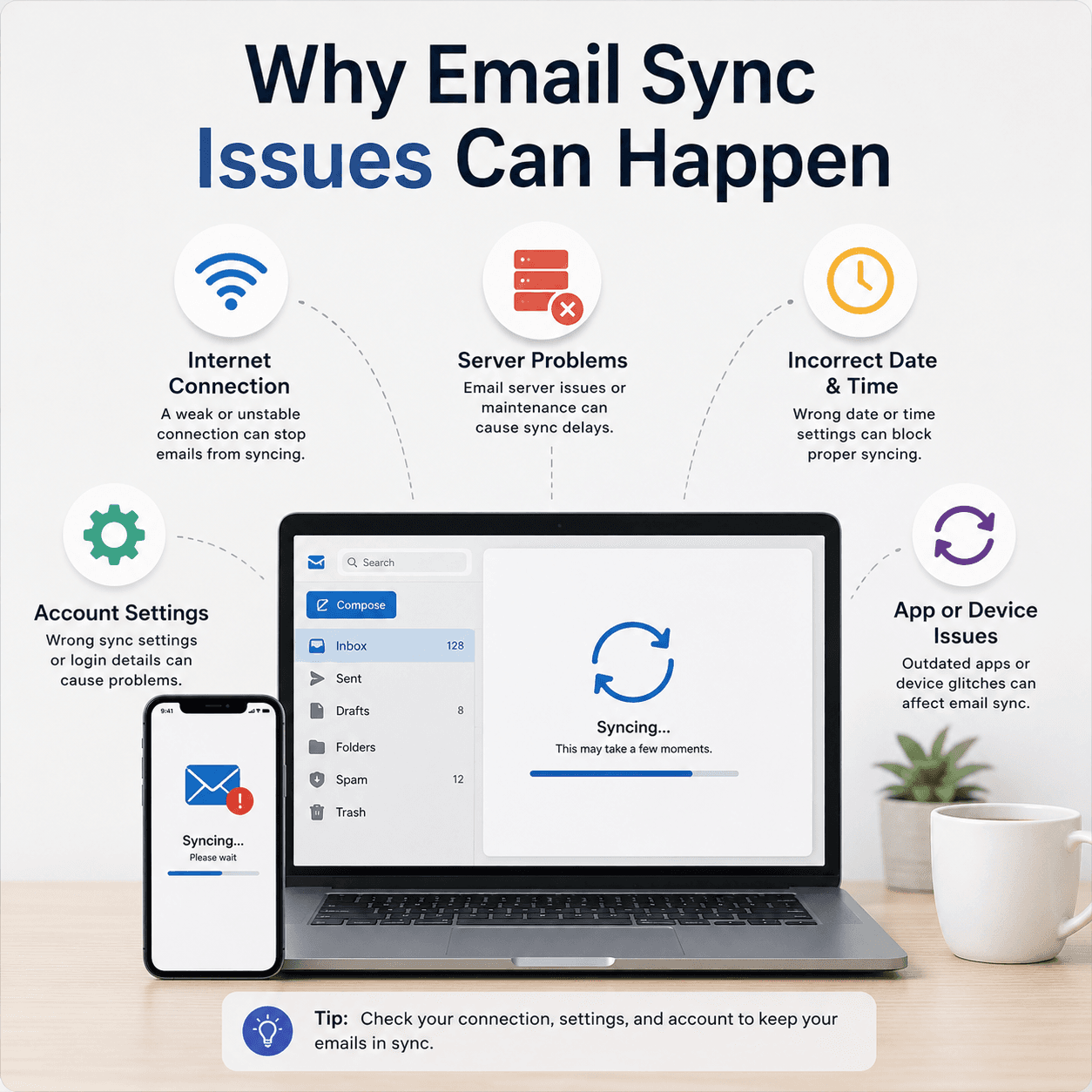
When email stops updating, it feels like something has broken. Usually, though, sync issues come from a small number of understandable causes that are easier to think about once you know the pieces involved.
Sync is simply the process of keeping your device's copy of a mailbox in step with the server's copy. Anything that interrupts or delays that conversation can make the inbox look out of date.
This guide explains what 'sync' means for email and why it can pause on either the receiving or sending side.
Sync interval
How often the app checks for mail; longer intervals look like delays.
Server-side pauses
Provider outages or busy periods can slow sync regardless of your device.
Account settings
Incorrect settings can break one direction of sync while the other works.
What syncing means
Syncing is the process of keeping your device's copy of a mailbox in step with the server's copy. With IMAP, that means new messages, read status, and folders stay consistent across all your devices. Sync depends on a working connection to the server.
If the connection is interrupted, or the app is set to check infrequently, the inbox can appear out of date even though nothing is truly wrong. Understanding the sync interval alone resolves some confusion.
How often your app checks
Many apps do not fetch mail continuously. Instead they check on a schedule, or when you open them, to save battery and data. If that interval is long, new mail can sit on the server for a while before it appears on your device, which looks like a delay but is working as configured.
Some setups support push, where the server notifies the device the instant mail arrives. Whether your account behaves like this depends on the provider and the app, and it explains why one device seems instant while another lags.
- Scheduled checks trade immediacy for battery and data savings.
- Push delivery notifies the device as mail arrives.
- A long interval can look like a fault when it is a setting.
Server-side pauses
Sometimes the delay is not on your device at all. Mail providers occasionally experience busy periods or brief outages, during which sync slows or pauses regardless of your settings. In those cases waiting is the appropriate response.
A quick way to sense this is to check whether the same account behaves the same way on another device. If it does, the issue is more likely on the server side than with any one device.
Account settings
Incorrect or outdated account settings are a common cause of persistent sync problems. Because receiving and sending are configured separately, a settings issue may affect only one direction — for example, mail arrives but will not send.
When sync fails consistently in one direction, that is a strong hint about where to look: the incoming server for receiving problems, the outgoing server for sending problems.
Connection and device factors
Sync ultimately needs a working connection. A weak Wi-Fi signal, a captive network that requires sign-in, or a device in a low-power state can all quietly interrupt the conversation with the mail server.
Ruling out the connection first — is other online activity working normally? — separates a mail-specific problem from a general connectivity one, and often explains an inbox that updates fine elsewhere but not in one particular place.
- Sync keeps your device's mailbox in step with the server's copy.
- A long check interval can look like a delay but is just a setting.
- Provider outages can pause sync regardless of your device.
- Because sending and receiving are separate, one can fail alone.
- A weak or restricted connection can quietly interrupt sync.
A note on purpose
This article is educational and general in nature. Exact steps and menus vary by device, brand, and software version — always follow the official documentation for your specific hardware. Handy Guide does not offer repair, remote access, or paid support services.
Frequently asked
It may simply be the sync interval, or a temporary connection or server pause. If it persists, account settings are worth reviewing.
Check the same account on another device. If it behaves the same way, the cause is more likely on the provider's side.
One may use push delivery while the other checks on a schedule. The scheduled device will naturally seem slower.
Yes. Sync needs a stable connection, so weak signal or a network that requires sign-in can interrupt it.
Related articles
 Email
EmailUnderstanding Email Sync Port Configurations
What ports and protocols do in email, how incoming and outgoing servers differ, why encryption settings must match the provider, and how to read a sign-in failure.
 Networking
Understanding DNS and IP Address Resolution
How website names become addresses, what DNS and the DNS cache do, why 'no internet' can point here, and how name resolution fits into a working connection.
 Networking
Basic Router and Wi-Fi Connection Concepts
A plain-language tour of how a router builds your home network, what the admin page is, why bands and channels matter, and how to tell a router problem from an internet problem.